
Why Engineering Students Need CAD Skills for Construction Industry Jobs
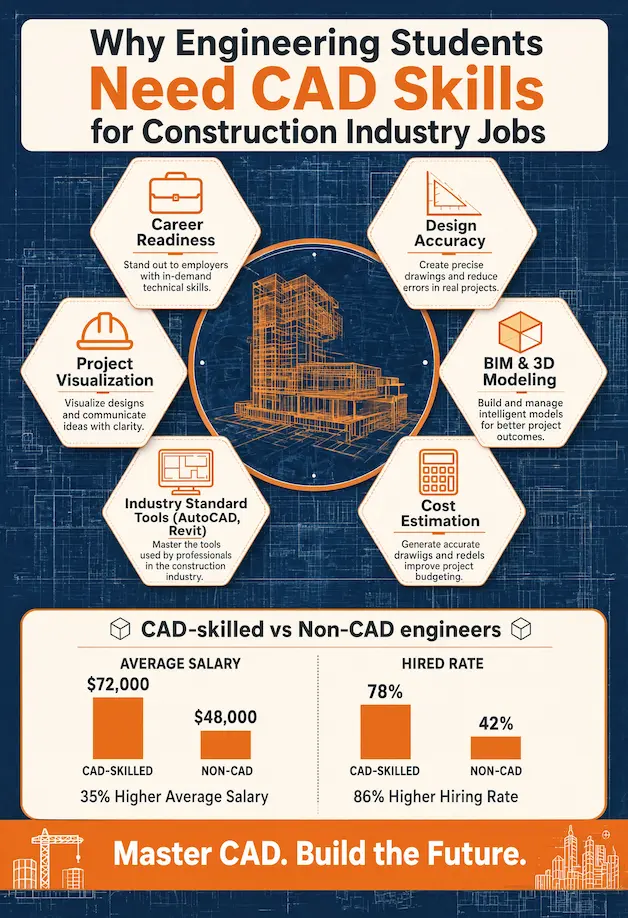
The students of engineering are in a job market where knowledge in the technical field is no longer sufficient in securing the offer. Employers seek graduates who are able to recognize real-world issues, apply concepts to implemented plans and express ideas using the already existing language used in the industry. That language is CAD(Computer-Aided Design). In a 2024 survey by the American Society of Civil Engineers, 78% of construction and civil engineering companies have made digital design proficiency their most important hiring criteria of entry-level engineers. In case you intend to work in the construction industry, CAD skills are not a choice and it is either you get a call back or not.
| Key Industry Statistic | Figure |
| Construction firms ranking CAD/digital skills as top hiring criterion | 78% (ASCE, 2024) |
| Global BIM market size (2024) | $9.1 billion |
| BIM market projected size by 2030 | $24.8 billion (CAGR 18.2%) |
| Engineers who report CAD skills have accelerated job placement | 65% (LinkedIn Workforce Report, 2023) |
| Average salary premium for CAD-proficient civil engineers (entry level) | +12–18% above peers |
| Construction projects using digital design workflows (large firms in 2024) | Over 90% |
CAD Bridges the Gap Between Classroom Theory and Real Construction Work
Why Theory Alone Leaves Students Unprepared?
Critical concepts are taught in engineering courses such as structural loads, drainage hydraulics, material strengths and safety codes. But theory is a source of a blind spot. Even those students who solve equations correctly in the classroom may have a hard time seeing how those numbers form a real beam, a cross-section of a road or a foundation. That disconnect creates fear in live projects and most students seek support so that they can bridge the gap.
How CAD Turns Formulas Into Physical Understanding?
CAD helps to make the relationship real. When a student learns beam design during a classroom session, he or she can instantly sketch that beam within a framed structure, clearance tests, and load paths. Workers who use drainage systems are able to create a complete plan with the gradient of pipes, the area of catchment and access chambers. By making theory and drawing practice complementary, students cease to look on the Internet to find out who can do my assignment and instead begin to seek answers within the model itself. Formulas are made into a construction tool not an exam tool.
Construction Employers Expect Digital Design Skills From Day One
What the Hiring Data Actually Says
The construction skills shortage is real and growing day by day. As per the LinkedIn Workforce Report of 2023, 65% of the engineers who updated their LinkedIn profiles with CAD capabilities noted that they had been fast-tracked through the hiring process. Meanwhile firms are spending time training 3-6 weeks worth of recruits who do not have any grasp of digital design to make CAD trained candidates much more valuable.
The Most In-Demand CAD Platforms in Construction in 2026
| Software | Primary Use | Market Adoption (Large Firms) | Difficulty Level |
| AutoCAD | 2D drafting, general design | 92% | Beginner–Intermediate |
| Revit | BIM, architectural & structural | 74% | Intermediate–Advanced |
| Civil 3D | Road, drainage and site grading | 68% | Intermediate–Advanced |
| SketchUp | Conceptual 3D modelling | 55% | Beginner |
| Navisworks | Clash detection, project review | 47% | Intermediate |
| Primavera / MS Project | Schedule linked to BIM | 41% | Intermediate |
A graduate who already knows about layers, dimensions, drawing standards and file management can work productively in the first week, saving employers time that otherwise could be spent in the onboarding process.
CAD Skills Sharpen Technical Communication Across the Entire Project Team
The Multi-Stakeholder Challenge in Construction
Each construction project consists of engineers, architects, contractors, surveyors, project managers, and clients, all of whom will have to interpret the same set of drawings. Spreadsheet notes and verbal explanations allow for misunderstanding. One misread dimension is enough to postpone a project by weeks and increase the cost by tens of thousands of dollars. According to the American Institute of Architects, up to 30% of the total construction waste in large projects is rework due to poor communication of design.
Why Precise CAD Drawings Reduce Costly Errors
A properly designed CAD file avoids uncertainty. It shows precise figures, material callout, section cuts and elevation marks and building notes in a common format that all professionals onsite comprehend. Students of engineering who train in the production of clean, fully annotated drawings develop a professional practice in communication that will be rewarded over their careers.
CAD Helps Students Master Complex Building Systems
Buildings Are Systems of Systems
In modern buildings, structural frames, HVAC network, electrical conduits, plumbing risers, fire suppression, insulation and facade systems are all put into one three-dimensional space. Each system is not controlled by one engineer. However, each engineer should be familiar with the interaction with the rest. This interdisciplinary coordination is one reason why students can Master AutoCAD to better visualize complex building systems, improve collaboration, and reduce design conflicts during project development.
Spotting Clashes Before They Reach the Site
CAD and BIM-based CAD allow students to overlay a variety of systems and identify spatial conflicts prior to a single bolt being installed. Any pipe passing through a structural beam, a duct that blocks a fire exit or a column that moves a doorway are all spotted at the drawing phase by students. Those who are trained in CAD and can be fixed in a few hours instead of days of demolition and re-work.
CAD Builds the Problem-Solving Mindset Construction Jobs Demand
Real Projects Change Constantly
Construction practitioners do not often implement a design that is completed in the same form as it was initially implemented. Clients revise layouts. Surveys of the site bring to light unforeseen soil conditions. Utility crossings cause a route change. Beam resizing is requested by structural engineers because of recalculations of the loads. Every change has a ripple effect in drawings, schedules and budgets.
Iterative Design Thinking Through CAD Practice
CAD educates students to approach design as an animate process. They edit models, side-by-side compare options, and follow the spread of a single change throughout the entire drawing set. This problem-solving aspect of thinking resembles actual construction work and results in CAD-trained graduates being much more effective problem-solvers than those who are taught to use only static hand-drafting.
CAD Skills Give Engineering Students a Competitive Edge for Internships
What Internship Recruiters Actually Screen For
Hundreds of applicants apply to internship in leading construction companies. Resumes are screened by the recruiters within less than 10 seconds on average. The mention of AutoCAD, Revit or Civil 3D on the list of a candidate instantly sets them apart when compared to those who mention only core coursework. A digital portfolio containing site plans, structural layouts, or 3D models is more tangible evidence of capability not potential.
Building a Portfolio That Gets Interviews
Professional project experience is not required of the students to create a good portfolio. Even scholarly drills show competence when the drawings are neat, properly annotated and well structured. A long list of modules passed can be outcompeted by three to five good-quality CAD examples, such as a floor plan, a road cross-section, a structural framing layout, etc.
- Include a combination of 2D plans and at least one model of 3D.
- Label all drawings with scale, north point and revision notations.
- Export files in industry standards like DWG, RVT and PDF.
- Include a short project note relating to the design intent.
Ready to Turn CAD Skills Into a Real Career?Get A Free Quote Now!
CAD Develops Precision and Professional Attention to Detail
Why Accuracy Is Non-Negotiable in Construction
A 10 mm error in drawing may be changed to a 10 mm error in a structural connection, a pipe fitting that fits or a panel on the facade that does not fit its opening. The tolerances are very low in construction and CAD trains students to think in those types of tolerances. They test units, check scale factors, cross-reference dimensions and check annotation layers habits that directly translate into professional practice.
How CAD Practice Builds a Professional Mindset
In addition to being accurate, CAD requires file discipline. Students get to know how to always name the files to sort the sets of drawings logically and to have the results that can be read by others without the need to ask questions. By following the top CAD drafting best practices, they develop professional workflows that improve efficiency and collaboration. The same discipline will make graduates simpler to deal with and integrate into project teams.
CAD Skills Prepare Students for BIM and the Future of Digital Construction
The BIM Revolution Is Already Here
BIM is no longer a new phenomenon and it is the mainstream process of large construction projects all over the globe. In 2024, the global BIM market is estimated to be $9.1 billion and is expected to increase at 18.2% annually to $24.8 billion by 2030. The BIM Level 2 is required by the UK government on all government-funded infrastructural projects. Similar requirements are provided in Singapore, the UAE and the EU.
CAD as the Foundation for BIM Competence
BIM applications such as Revit are much easier for students who understand CAD geometry, how to manage layers and how to coordinate drawings. The reasoning behind-the-scenes spatial thinking, system coordination and documentation standards transfer directly. BIM does not substitute CAD; it is the platform on which BIM proficiency is established.
| Skill Level | Tools | Typical Roles Available | Average Starting Salary (UK/US Ref.) |
| CAD Basics | AutoCAD, SketchUp | CAD Technician, Graduate Engineer | £26,000–£32,000 / $48,000–$58,000 |
| CAD + BIM | AutoCAD, Revit, Navisworks | BIM Coordinator, Design Engineer | £32,000–£42,000 / $60,000–$75,000 |
| Advanced BIM | Revit, Civil 3D, Dynamo | BIM Manager, Project Engineer | £42,000–£58,000 / $75,000–$95,000 |
| BIM + GIS/Digital Twin | Revit, ArcGIS, InfraWorks | Digital Engineering Lead | £55,000+ / $95,000+ |
CAD Supports Civil Engineering and Infrastructure Project Work
Construction Beyond Buildings
The work of civil engineering graduates is very diverse, including roads, bridges, drainage systems, water treatment, land development and coastal facilities. All these types of projects require varying skills in CAD. Horizontal and vertical alignment instruments are needed in road design. Catchment modelling and pipe sizing are needed in drainage. Grading, earthworks and utility coordination are required in land development.
Civil 3D and Site Planning Competencies
The Civil 3D is the preferred tool of civil infrastructure in the majority of English-speaking markets. Having acquired surface modelling, corridor design and pipe network tools in Civil 3D, students can work on infrastructure projects at consulting engineering firms, local governments and government agencies immediately. Learning to read and create survey data, boundary plans and infrastructure drawings will leave civil graduates ahead of the pack during any interview.
CAD Strengthens Academic Performance and Final-Year Projects
Producing Work That Stands Out in Submissions
CAD skills are directly applicable in university design projects, lab reports and capstone submissions. A learner who submits a well-illustrated structural plan and a written work of analysis makes their work appear and read like that of a professional. The assessors will be able to discern the difference between a manually created schematic and a well-drawn CAD diagram that is scaled to proper proportions and annotated. Learning about the different options available for permanent-license CAD software alternatives will enable students to make intelligent decisions when using this software in the future. Powerful visual messages back powerful marks.
CAD as a Thinking Tool Not Just a Drawing Tool
Regular users of CAD have noted that the drawing process compels them to solve the details that would be overlooked otherwise. A dimension absent, a geometry impossible, an element in conflict, is an indication of a fault in the design thinking not the drawing. Therefore, CAD enhances the quality of the submission made and the level of thinking applied in the engineering process.
How Engineering Students Can Start Learning CAD Effectively
Step-by-Step Learning Path for Beginners
Students don’t need to master all tools at the same time. A step-by-step approach minimizes the feeling of being overwhelmed and develops true competence:
- Week 1-4: AutoCAD fundamentals – interface, drawing, layers, dimensions and annotation.
- Week 5-8: Finish a basic floor plan and road cross section drawing.
- Week 9-12: Revit introduction – walls, floors, roofs, schedules and simple documentation.
- Week 13-16: Civil 3D basics- surfaces, alignments, profiles and pipe networks.
- Week 17-20: Integrate capabilities in a final project – a coordinated site plan with building and infrastructure features.
Free and Low-Cost Resources That Work
| Resource | Platform | Best For | Cost |
| Autodesk Student Access | Autodesk Education Community | AutoCAD, Revit, Civil 3D | Free for students |
| SketchUp for Students | SketchUp.com | Conceptual 3D modelling | Free |
| LinkedIn Learning | linkedin.com/learning | CAD tutorials with certificates | Free via many universities |
| YouTube — Balkan Architect | YouTube | Revit fundamentals | Free |
| Coursera — BIM for Construction | Coursera | BIM strategy and Revit | $49/month or audit free |
| Autodesk Certified Professional Exam | Autodesk | Industry recognised certification | $250 (one-time) |
Final Thoughts
CAD Is the Professional Language of Construction
Engineers working in the construction industry require a precise mindset to work, visual communication and adaptability to change. All are provided through CAD skills. They close the divide between the academic theory and site reality, enhance technical communication in interdisciplinary project teams, and open the doors to advanced digital workflows such as BIM.
The statistics speak volumes. 90+% of big construction companies operate digital design processes. The BIM market expands by 18.2% every year. Graduates who are proficient in CAD earn 12-18% higher salaries than others. These are not fringe benefits; they are career-making differences.
Students of engineering who invest in CAD skills not only enhance their resumes today. They get to learn the professional language that the construction industry uses to think, plan and construct. Through industry-focused training and resources from CAD Drafter, learners can develop practical design expertise that aligns with real-world project requirements. And learners who acquire that language in early years are ready to work for their first employment, not to watch.
FAQs
Do students of engineering require any previous experience in drawing to study CAD?
No. CAD tools are ground-level. Within four to six weeks of practicing every day, students who have never come into contact with technical drawing can master the fundamentals of AutoCAD. Introductory workshops are also offered in the first year in most universities.
What is the best CAD software that an engineering student should learn first?
Start with AutoCAD. It educates in the universal logic of layers, dimensions, drawing standards and file management upon which all other CAD and BIM tools are based. When you are comfortable with AutoCAD, switch to Revit or Civil 3D based on your specialisation.
Are there any free professional CAD software programs that can be accessed by the students?
Yes. AutoCAD, Revit, Civil 3D, and Fusion 360 are available free under the Education Community programme offered by Autodesk. Students enroll using a university email address and are allowed to download full software versions at zero cost.
What is the time frame to job-readiness in CAD?
With regular practice, most students achieve a level of employability after six to twelve months of practice in clean 2D drawings and simple 3D models, in addition to their studies. Regular small classes (one to two hours, three times a week) are more effective than occasional marathon cramming classes.
Does having CAD assure a construction job?
CAD skills facilitate access but do not replace more general engineering expertise. Employers are seeking graduates who are proficient in technical skills, communication abilities, teamwork and digital skills. CAD does not replace basic engineering principles: CAD enhances a good candidate.
Is BIM substituting CAD and should students not go directly to BIM?
BIM builds up and expands CAD; it does not substitute it. Students who attempt CAD and then directly move to Revit frequently have difficulty with the concepts of coordinate systems, drawing organisation and space thinking. Get acquainted with CAD, then proceed to BIM tools.

