
The Ultimate Guide to BIM Execution Plans (BEP)
In the high-stakes arena of modern construction, the margin for error is shrinking while project complexity is skyrocketing. A single coordination oversight or a misinterpreted data set can lead to millions in losses. According to industry research, nearly 30% of all construction work is actually rework, much of which is caused by poor information management. This is why the most successful projects today don’t start with an excavator or a blueprint, they start with a BIM Execution Plan (BEP).
This blog is a definitive deep-dive into the world of BEPs. We will explore how this foundational document transforms Building Information Modeling from a mere 3D visualization tool into a powerhouse of project intelligence. Over the next few thousand words, you will learn the precise definition of a BEP, its critical components, implementation strategies, and the legal and technical nuances that separate a “good” project from a “world-class” one.
What Is a BIM Execution Plan (BEP)?
At its core, a BIM Execution Plan (BEP) is a structured, comprehensive document that defines exactly how Building Information Modeling will be implemented throughout a project’s lifecycle. However, to view it as “just a document” is a mistake. In practice, the BEP is the governing constitution of a construction project just like CAD automation workflows.
A Clear Definition
The formal definition of a BEP is: A strategic roadmap, agreed upon by all key stakeholders, that outlines the roles, responsibilities, standards, technical protocols, and communication workflows required to deliver a BIM-enabled project.
The Backbone of Digital Construction
Without a BEP, BIM is often referred to as “Lonely BIM.” This happens when architects, engineers, and contractors create their own models in silos. While those models might look impressive, they cannot “talk” to each other. The BEP is the bridge. It acts as a universal translator, ensuring that a door scheduled by the architect is recognized by the security contractor and maintained by the facility manager twenty years later.
The BEP as a Reference and Coordination Tool
The BEP is the “Single Source of Truth” (SSOT). Whenever a dispute arises regarding data ownership, model detail, or file naming, the team refers to the BEP. It serves as:
- A Technical Manual: Listing software versions and file formats.
- A Communication Protocol: Defining how and when data is shared.
- A Quality Benchmark: Setting the bar for what constitutes a “complete” model.

Why BEP Matters: Importance & Strategic Value
Why do we invest hundreds of hours into a document before a single line is drawn in Revit? Because the strategic value of a BEP is the highest ROI activity in the pre-construction phase.
Improving Collaboration and Coordination
The construction industry is notoriously fragmented. A medium-sized project can involve over 50 different firms. The BEP clarifies roles and communication protocols, effectively dismantling the “silo” mentality.
- Role Clarity: Everyone knows who is responsible for which part of the model.
- Data Integrity: It ensures that when data is shared, it is accurate, formatted correctly, and timely.
- Syncronized Workflows: It sets the rhythm for model updates, preventing the scenario where an engineer spends three days working on an outdated architectural layout.
Reducing Risk and Errors
Risk management is where the BEP pays for itself. By defining a Clash Resolution Process, the BEP moves the “clash” from the job site to the digital office.
Industry Note: Resolving a pipe-clash with a structural beam digitally costs approximately $10 in “modeling time.” Resolving that same clash on the construction site can cost upwards of $2,500 in materials, labor, and schedule delays.
Enhancing Efficiency and Productivity
Productivity in construction has historically lagged behind other sectors like manufacturing. The BEP changes this by standardizing workflows.
| Efficiency Driver | Impact of BEP |
| Standardized Naming | Reduces time spent searching for files by up to 15%. |
| Clear LOD (Level of Dev) | Prevents “Over-modeling,” ensuring engineers don’t waste time on unnecessary detail. |
| Automated QC | Allows for automated software scripts to check for errors based on BEP rules. |
Supports Compliance & Quality Standards
With the global adoption of ISO 19650, the BEP is no longer optional for high-value projects. It ensures that the project team is following international best practices for Information Management. This is particularly vital for projects seeking sustainability certifications like LEED or BREEAM, where data transparency is a prerequisite for credits.
Facilitates Lifecycle Value
A building is a 30-to-50-year asset. The design and construction phase is only a tiny fraction of its life. A well-crafted BEP ensures that the Asset Information Model (AIM) is useful for the owner long after the contractors have left the site.
- Maintenance: Facility managers can click a pump in the digital twin and instantly see its warranty info and spare parts list.
- Renovations: Accurate “as-built” models provided via the BEP make future renovations significantly cheaper by removing the guesswork.
The Strategic Alignment Table
To understand the value of the BEP, we must look at how it aligns different stakeholder interests.
| Stakeholder | Primary BEP Value |
| The Owner | Ensures the final digital asset is usable for Facility Management (FM). |
| The Architect | Protects design intent and clarifies the scope of digital deliverables. |
| The Contractor | Reduces field rework and provides accurate quantities for procurement. |
| The Sub-Contractors | Provides clear instructions on how to integrate their fabrication models. |
Core Components of a BIM Execution Plan
To build a winning BEP, you must break the document into digestible, actionable sections. Each component serves a specific purpose in ensuring data integrity and team synchronization.
Project Information and Objectives
The first section is the “Compass.” It lists the project name, location, and key milestones. However, the most critical element here is the BIM Use Case. Are you using BIM for solar analysis, acoustic simulation, or purely for clash detection? Defining these objectives ensures the team doesn’t waste resources on data that won’t be used.
Roles, Responsibilities, and Authorities
BIM is a team sport, and every team needs a captain and specialist players. This section defines who has the authority to approve a model and who is responsible for the “Information Exchange.”
- Project BIM Manager: The lead governor of the BEP.
- BIM Coordinator: The “boots on the ground” who aggregates models and runs clash reports.
- Model Authors: The architects and engineers who create the actual geometry and data.
BIM Deliverables and Milestones
This is the “Contractual Checklist.” It lists exactly what will be delivered at each stage (e.g., Concept, Detailed Design, Construction). It should clearly state whether the output is a native Revit file, an IFC file, or a COBie spreadsheet for facility management.
Learn The Basics Of BIM Execution Plans
Standards, Protocols, and Software Tools
This is the technical “Dictionary.” To prevent digital chaos, everyone must use the same language.
- Software Versions: “Revit 2024” (Consistency is key; mixing versions can corrupt data).
- File Naming: Following standards like ISO 19650 (e.g., Project-Originator-Volume-Level-Type-Role-Number).
- Classification Systems: Using Uniclass or OmniClass to categorise building elements.
Level of Development (LOD) Specifications
LOD is the scale of “Digital Maturity.” It prevents the architect from spending too much time on a door handle during the early concept phase.
| LOD Level | Definition | Example: Structural Column |
| LOD 100 | Conceptual | A vertical line representing a column. |
| LOD 200 | Approximate | A rectangular shape with approximate dimensions. |
| LOD 300 | Precise | Exact size, material grade, and location. |
| LOD 350 | Coordination | Column + connection plates and rebar clearance. |
| LOD 400 | Fabrication | Shop-drawing level detail; ready for manufacturing. |
Collaboration and Data Exchange Requirements
Cloud-based CAD collaboration is just one of the examples of mutual CAD drafting services, Then, there’s the Common Data Environment (CDE). It specifies how often the team must “sync” their models, daily, weekly, or bi-weekly, and how data will be transferred securely between firms.
Quality Assurance and Quality Control (QA/QC)
The BEP must outline the validation routines.
- Model Integrity Checks: No “floating” elements or duplicate items.
- Clash Detection: The protocol for identifying and resolving physical interferences.
- Data Validation: Checking that all required parameters (like fire ratings) are actually filled in.
Risk Management Strategy
This section anticipates digital pitfalls. What happens if the CDE server goes down? What is the process if a major software update occurs mid-project? Having a contingency plan for data loss or corruption is essential for high-value projects.
Types of BEP: Pre-Contract vs. Post-Contract
A BEP is not a static document; it is a living entity that evolves as the project moves from the “dreaming” stage to the “building” stage.
The Pre-Contract BEP (The Tender Phase)
The Pre-Contract BEP is developed by the lead bidder (usually the lead architect or main contractor) during the tender process. Think of it as a digital proposal.
- Purpose: To demonstrate to the client that the team is capable of meeting the Information Requirements.
- Focus: It highlights the team’s strategy, their proposed software stack, and their preliminary “Information Delivery Plan.”
- Key Question: “Can this team deliver the digital data the client needs?”
The Post-Contract BEP (The Execution Phase)
Once the contract is awarded, the Pre-Contract BEP is expanded into the Post-Contract BEP. This is the operational manual.
- Purpose: To provide a detailed, binding plan for how the project will be executed.
- Focus: It includes the names of all sub-contractors, specific delivery dates for every model, and finalized technical protocols.
- Key Question: “How are we specifically working together on a day-to-day basis?”
Comparing the Two Stages
The transition from Pre to Post-Contract is a critical milestone in project management.
| Feature | Pre-Contract BEP | Post-Contract BEP |
| Created By | Lead Proposer/Tenderer | Lead Contributor + Appointed Parties |
| Level of Detail | Strategic/Generic | Tactical/Specific |
| Timeline | Bid Stage | Project Kickoff onwards |
| Legal Status | Statement of Capability | Contractually Binding Document |
| Primary Goal | To win the work | To execute the work |
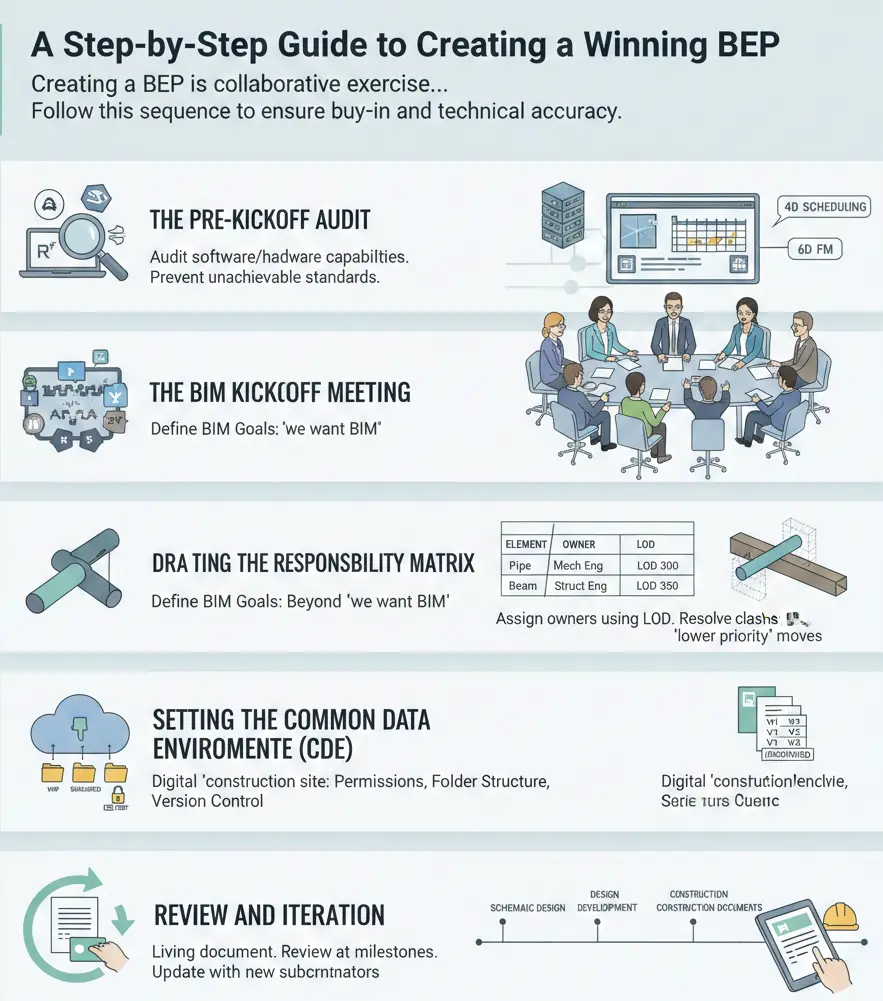
A Step-by-Step Guide to Creating a Winning BEP
Creating a BEP is a collaborative exercise. If a BIM Manager writes it in isolation, it will likely be ignored by the consultants who feel it doesn’t reflect their actual workflows. Follow this sequence to ensure buy-in and technical accuracy.
Phase One: The Pre-Kickoff Audit
Before drafting a single word, you must understand the constraints of your team. This involves auditing the software capabilities of your consultants. Do they all use Revit? Are some on ArchiCAD? Do they have the hardware required to handle high-LOD models? This audit prevents you from setting standards that the team cannot physically achieve.
Phase Two: The BIM Kickoff Meeting
This is the most important meeting in the project’s digital lifecycle. Here, you define the project’s “BIM Goals.” You must move beyond “we want BIM” to “we want BIM for 4D scheduling and 6D facility management.”
Phase Three: Drafting the Responsibility Matrix
Using the LOD (Level of Development) framework discussed in Part 2, you must now assign owners. If a pipe hits a beam, who moves? The BEP should state that the “lower priority” system (usually the one easiest to reroute) is moved by its respective author. This clarity prevents weeks of circular arguments during the coordination phase.
Phase Four: Setting the Common Data Environment (CDE)
You must establish the digital “construction site.” This involves:
- Permission Levels: Who can “View” vs. who can “Edit.”
- Folder Structure: Standardising where “Work in Progress” (WIP) files live versus “Shared” or “Published” files.
- Version Control: Ensuring that old versions are archived so no one accidentally builds from an outdated model.
Phase Five: Review and Iteration
A BEP is a living document. It should be reviewed at every major milestone (e.g., at the end of Schematic Design, Design Development, and Construction Documentation). As new subcontractors join the project during the construction phase, the BEP must be updated to include their specific fabrication protocols.
Best Practices for BEP Excellence
To ensure your BEP doesn’t just sit on a digital shelf gathering dust, follow these industry-proven best practices:
- Keep it Visual: Use flowcharts for communication paths and screenshots for folder structures. A picture is worth a thousand lines of technical prose.
- Mandate Cloud Connectivity: In 2025, sending models via email or FTP is obsolete. Use cloud-based CDEs that allow for real-time model “linking.”
- Focus on the “I” in BIM: Information is more important than 3D geometry. Ensure your BEP focuses heavily on data parameters (like manufacturer info or fire ratings) rather than just making the model look “pretty.”
- Standardize Your Templates: Don’t start from scratch for every project. Create a “Master BEP Template” that can be customized for specific project needs.
- KPI Tracking: Use Key Performance Indicators to monitor BEP adherence. For example, track the number of clashes resolved per week or the percentage of models that pass automated QC checks.
Challenges in Implementing BEP (and Their Solutions)
Even with a perfect document, you will face hurdles. Construction is an industry steeped in tradition, and “digital transformation” often meets friction.
Challenge: Resistance to Change and Cultural Inertia
Many veteran site managers or engineers view BIM as an “extra step” that slows them down.
- Solution: Focus on the “WIIFM” (What’s In It For Me). Show the site manager how the BEP’s clash detection prevented a two-week delay in the basement. When people see that the plan saves their time, they become its biggest advocates.
Challenge: Inconsistent Data Practices
Different firms have different internal standards. When these collide, the integrated model becomes a mess.
- Solution: Strict adherence to ISO 19650 and the use of “Automated Validation Tools.” Use software that automatically “rejects” a model upload if the file naming doesn’t match the BEP protocol.
Challenge: The “Over-Modeling” Trap
Teams often model too much detail too early, leading to bloated files that crash computers and hide critical information.
- Solution: Reiterate the LOD requirements in every coordination meeting. If the project only requires LOD 200 for a certain phase, penalize teams that submit LOD 400.
| Common Challenge | Impact | Strategic Solution |
| Lack of Training | Poor data entry and model errors | Budget for 4-hour “BEP Onboarding” for all leads |
| Software Version Conflict | Data corruption / loss | Contractually mandate a specific software version |
| Silent Silos | Unresolved clashes in the field | Mandatory weekly “Live Coordination” sessions |
Future Trends: The Evolution of the BEP
The BEP of 2025 is already vastly different from the BEP of 2015. We are moving toward a more automated, intelligent future.
Digital Twins and IoT Integration
Modern BEPs are now including sections on “Asset Tagging” for Digital Twins. This involves linking model elements to real-world sensors. The BEP defines how data from an HVAC sensor will be mapped back to the BIM model to allow for predictive maintenance.
AI-Driven Compliance
We are entering the era of “Self-Correcting BEPs.” AI algorithms can now scan a BEP, understand the rules, and then monitor the project CDE in real-time. If a user tries to place a component that violates the BEP’s naming or LOD rules, the AI provides an instant correction.
Generative Design Protocols
As architects use AI to generate thousands of design iterations, the BEP must evolve to define how these “AI-generated” models are vetted, selected, and integrated into the master project file.
Legalities, Security, and Smart Integration
While the previous sections focused on the “how” of coordination and the “what” of technical components, this final chapter addresses the critical administrative and future-looking layers of a BIM Execution Plan. In 2025, data is the most valuable asset on a construction site; protecting and leveraging that data is what separates a modern leader from an outdated firm.
Data Ownership and Intellectual Property (IP)
Unlike BIM and GIS integration, the relation between IP and data ownership is quite complex. One of the most interesting challenges in digital construction is determining who owns the data. When an architect designs a unique structural joint and a sub-contractor modifies it for fabrication, the lines of Intellectual Property (IP) become blurred.
A high-performing BEP must explicitly address Data Sovereignty. It should clarify that while the client usually owns the final “as-built” model, the individual consultants retain the IP rights to their specific design methodologies and families.
Key Legal Clauses for the BEP:
- Grant of License: Specify that consultants grant the client a non-exclusive license to use the model data specifically for the operation and maintenance of that building.
- Liability Limitations: The BEP should state that the model author is not liable for any unauthorised modifications made to the model after handover.
- Reliance Levels: Clearly define which parts of the model can be “relied upon” for construction and which are “for information only.
Cybersecurity: Protecting the Digital Twin
As buildings become smarter and construction data moves entirely to the cloud, the risk of cyberattacks increases. A breach in a BIM model could reveal sensitive security layouts of a government building or allow hackers to plant malware in a building’s automation system.
The Cybersecurity Protocol in a BEP
Your BEP should mandate a Cybersecurity Strategy that aligns with ISO 19650-5 (the part of the standard focusing on security-minded information management).
- Role-Based Access Control (RBAC): Not every user needs to see every folder. The BEP should define who has “View Only” vs. “Full Edit” rights.
- Multi-Factor Authentication (MFA): Mandate that any access to the Common Data Environment (CDE) must be protected by MFA.
- Data Residency: For sensitive projects, the BEP may need to specify that all project data must be stored on servers located within a specific country to comply with local data laws.
Smart Buildings and IoT Integration
The BEP is the birth certificate of a Smart Building. To ensure that a building can “talk” to its users, the data must be structured correctly from day one.
In this section of the BEP, you define the Asset Tagging Strategy. Every valve, sensor, and air handling unit (AHU) must have a unique identifier that matches the building’s asset management software. This allows for:
- Predictive Maintenance: The system alerts the manager before a part fails based on real-time sensor data.
- Energy Optimization: Linking the BIM model to occupancy sensors to automatically dim lights or reduce cooling in empty rooms.
The Digital Handover: Beyond the PDF
The most common failure in construction is the “Document Dump,” handing the owner a thumb drive full of unorganized PDFs and 3D files. A modern BEP prevents this by defining the Handover Protocol.
| Handover Deliverable | Purpose | Format |
| Asset Information Model (AIM) | The final, verified digital twin of the building. | Native Files & IFC |
| COBie Data | A non-proprietary spreadsheet of all equipment and warranties. | Excel / XML |
| O&M Manuals | Digital manuals linked directly to the 3D components. | Hyperlinked PDF |
By mandating COBie (Construction Operations Building information exchange) within the BEP, you ensure that the owner can instantly import the building data into their Facility Management software without manual data entry.
Conclusion: The ROI of the Plan
The BIM Execution Plan is far more than a technical requirement; it is the fundamental bridge between a chaotic construction site and a streamlined digital asset. By investing the time to define roles, standards, and workflows at the project’s inception, you are effectively buying “insurance” against rework, litigation, and wasted materials.
A project without a BEP is a project built on hope that the architect and engineer are on the same page, and hope that the data will be useful to the owner. A project with a BEP is a project built on certainty. It ensures that every megabyte of data created during the design process adds tangible value to the physical building. As we move deeper into the age of digital twins and automated construction, the BEP remains the single most important tool in a project manager’s toolkit. It is the blueprint for success in a digital world.
Frequently Asked Questions (FAQs)
Who is responsible for writing the BEP?
The Lead Appointed Party (usually the Lead Architect or Main Contractor) is responsible for coordinating the BEP, but it must be a collaborative effort involving all major consultants and the client.
Can a BEP be changed once the project has started?
Yes. In fact, it should be changed. A BEP is a living document. As new subcontractors join or as project goals shift (e.g., adding a sustainability target mid-way), the BEP should be updated to reflect the new reality.
Is a BEP legally binding?
In most modern contracts, yes. The BEP is usually referenced in the “BIM Addendum” of a contract, making the delivery of models as specified in the BEP a contractual obligation.
What is the difference between an EIR and a BEP?
The EIR (Exchange Information Requirements) is a document written by the Client stating what they want. The BEP is written by the Project Team stating how they will deliver what the client wants.
Do small projects really need a BEP?
While the BEP for a small residential house may be only five pages, it is still necessary. Even on small projects, miscommunication between a structural engineer and an architect can lead to expensive errors.
What software is best for creating a BEP?
While many use Word or PDF, modern teams are moving to cloud-based “BIM Management Platforms” like Plannerly or Notion, which allow for easier updates and better stakeholder tracking.
How does ISO 19650 affect the BEP?
ISO 19650 provides the global standard for the structure of the BEP. It ensures that regardless of whether a project is in London, Dubai, or New York, the way information is managed follows a consistent, high-quality framework.